AI Included in every Xpress ASSIST plan

Meet Xpress Genie. IT help that never sleeps.

Tell Genie the problem in your own words. It checks the PC, explains what is wrong in plain English, and fixes it safely, but only after you say yes. When it can't fix something, an Xpress support technician takes over with all the details.

Any time, day or night Only fixes approved by Xpress Nothing changes without your Yes
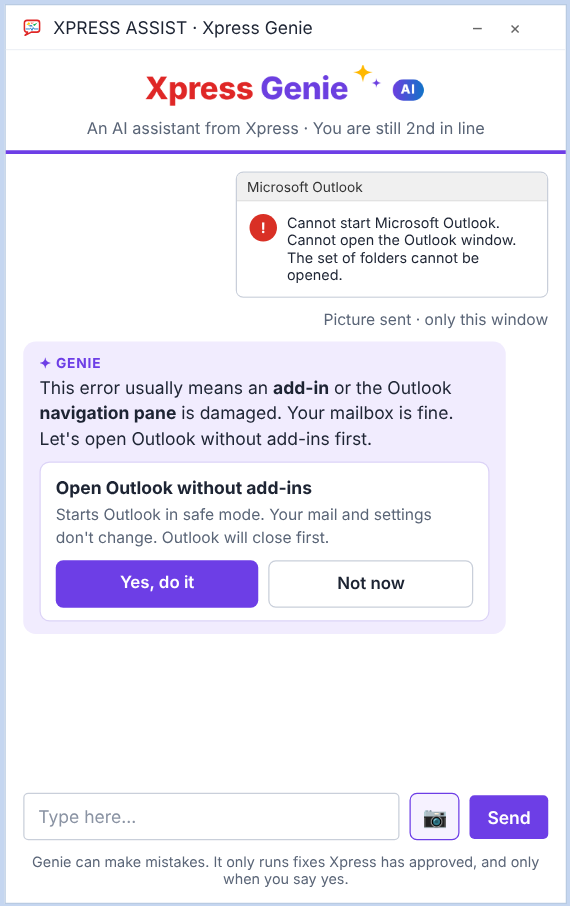
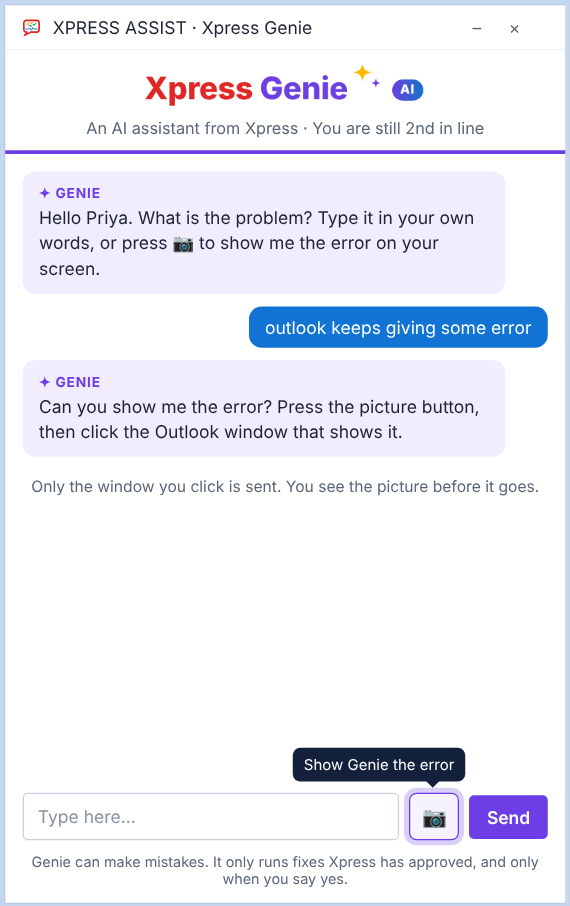
Xpress Genie reading an Outlook error and offering a fix
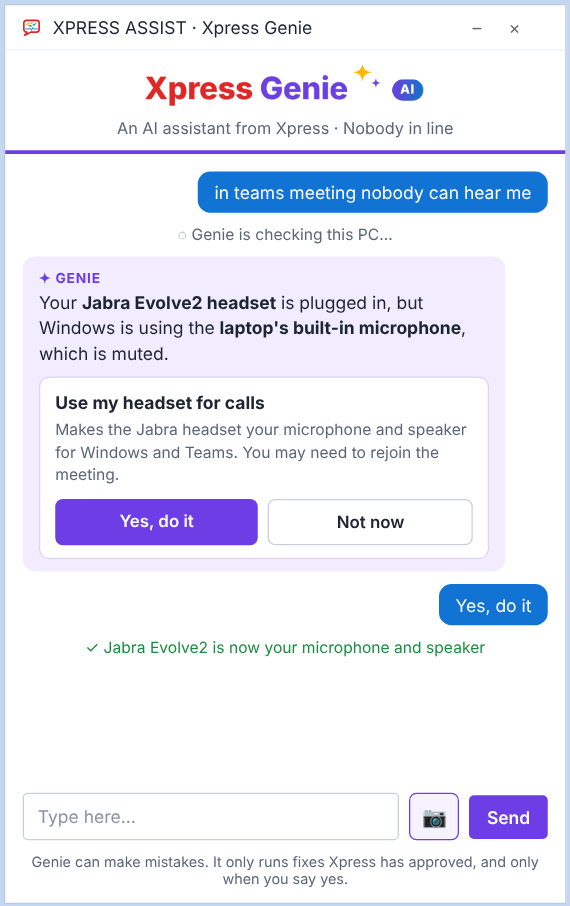
Xpress Genie fixing a Teams microphone problem
A happy user at her PC
Fixed in 40 secondsJabra headset is now your microphone

30fixes approved by Xpress, from printers to Windows Update
24x7Genie is there at 8 PM, on Sundays and on holidays
1 click"Yes, do it". Nothing changes on your PC without it
7common problems that fix themselves before anyone notices
Talk to it like a colleague

No more "please hold". Just say what's wrong.

Your staff don't need to know the right words. "Outlook very slow and PC hangs" is enough. Genie looks at the PC's health first, so its answer is about this PC, not a generic tip from the internet.

  • Checks disk space, printers, network, antivirus and updates before it answers
  • Explains the cause in plain English
  • Offers one safe fix at a time, with a clear "Yes, do it" button
  • Tells you when it's done, and checks that it worked
An employee frustrated by a slow PC
BeforeSlow PC, deadline in an hour.
Xpress GenieAI helper
outlook very slow and pc hangs
โœฆ GENIEI checked this PC. Your C: drive has only 2.1 GB free, which is why Outlook is slow. I can clear temporary files. Your documents won't be touched.
Yes, do it
โœ“ 11.8 GB freed. C: drive now 14 GB free.
What Genie does

An IT helper on every PC

Genie is part of the Xpress ASSIST app. Click Ask Xpress Genie, or let it help while you wait for a support technician.

Fixes, not just advice

30 fixes for everyday problems: stuck printing, Outlook, Teams, OneDrive, Wi-Fi, shared drives, slow PCs, Windows Update and more.

Show Genie the error

Press the picture button and click the window with the error. Genie reads it and picks the right fix. Only that one window is sent.

Fixes itself overnight

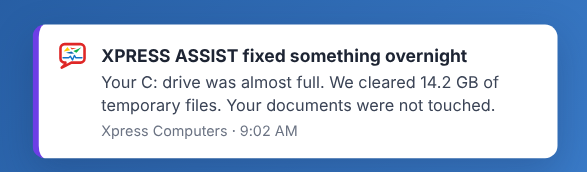
A full disk, antivirus that switched off, a stuck print queue or a wrong clock are fixed automatically, and the user gets a short note.

Helps out of hours

At 8:40 PM on a Saturday, Genie still checks the PC and tries safe fixes. Anything it can't fix becomes a support call for the morning.

Hands over to a person

When a problem needs a person, Genie passes it to an Xpress support technician with what it found and what it tried. No repeating yourself.

Everything is logged

Every Genie fix is a support call in your control panel and in your monthly IT report, so you see exactly what was fixed and where.

Show Genie the error

One button. Genie sees the error and knows what to do.

Error messages are confusing. Your staff just press the picture button and click the window that shows the problem. Genie reads it, explains it, and offers the fix that matches.

  • Only the one window you click is sent, never the whole screen
  • You see the picture first, and can press Cancel
  • The picture stays with the support call, so a technician sees it too
The Show Genie the error button
Genie reads an Outlook error
Self-healing

Some problems fix themselves before anyone notices.

Xpress ASSIST checks every PC around the clock. When it finds one of these common problems, it fixes it on its own, checks that the fix worked, and tells the user in the morning.

  • Disk almost full: temporary files are cleared at night
  • Antivirus switched off: it is turned back on and updated
  • Print jobs stuck for an hour: the queue is cleared
  • Clock wrong: it is corrected
  • Windows Update stuck for weeks: it is reset at night

A PC is never restarted on its own: the user picks the time. Self-healing never runs on servers.

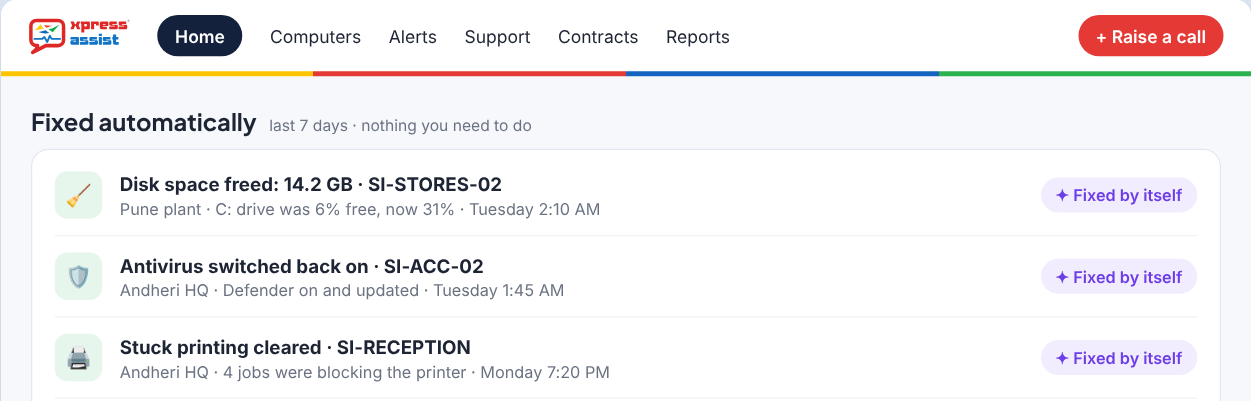
Fixed automatically, in the customer control panel
The morning note: Xpress ASSIST fixed something overnight
Out of hours

8:40 PM on a Saturday? Genie is still here.

Our support technicians work 9:30 AM to 6 PM on working days. Genie works the rest of the time. It checks the PC and tries the safe fixes. If the problem needs a person, it saves a support call with everything it found and your call-back number, ready for the morning.

How out-of-hours help works
Xpress GenieOut of hours
๐ŸŒ™ It's 8:40 PM, Saturday. Our support technicians are back at 9:30 AM on Monday. I can still check your PC and try safe fixes now.
VPN not connecting, need to send file tonight
โœฆ GENIEYour internet works, but the VPN server isn't answering. That's not something I can fix from this PC, so I've saved a support call. Meanwhile, you can share the file from OneDrive.
โœ“ Support call saved for Monday 9:30 AM
Problem: VPN won't connect; internet OK
Genie tried: network check, VPN server test
We'll call: Priya ยท 98200 12345
How a Genie fix works

Four steps, usually under a minute

You tell Genie

Type the problem in your own words, or show Genie the error.

Genie checks the PC

It looks at the PC's health and finds the likely cause.

You say yes

It explains the fix in one line. Nothing happens until you press "Yes, do it".

Fixed and logged

Genie checks it worked and logs it. If not, a support technician takes over.

Safe by design

Clever, but always careful

Genie can make mistakes, like any AI. That's why it can only use fixes Xpress has written and tested, and only with your OK.

Genie can

  • Answer "how do I" questions about Windows and Microsoft 365
  • Explain what is wrong, using the PC's health data
  • Run any of the 30 fixes approved by Xpress, after you say yes
  • Read the one window you choose to show it
  • Hand over to a support technician with a summary
  • Log everything it does as a support call

Genie never

  • Changes anything without your "Yes, do it"
  • Makes up its own commands
  • Reads your files or e-mails
  • Deletes your documents
  • Installs software or changes passwords
  • Looks at your screen unless you press the picture button
For business owners

See every fix Genie made for your team

Every Genie fix shows in your Xpress ASSIST control panel, and in the monthly IT report under "Fixed for you". You see what broke, where, and how quickly it was sorted, without a single phone call.

  • "Fixed automatically" on your control panel home page
  • Monthly count: fixed by itself, by Genie, by support technicians
  • Each fix shows the PC, the site and the time
A business owner checking the Xpress ASSIST control panel on his phone
23 problems fixed this month12 fixed by themselves, 7 by Xpress Genie, 4 by support technicians.
Questions

About Xpress Genie

Does Xpress Genie cost extra?

No. Genie is included in every Xpress ASSIST plan: Silver, Gold, Gold+ and Platinum.

Will Genie replace your support technicians?

No. Genie handles the quick, common fixes so that our support technicians can spend their time on the problems that need a person. You can always click Connect to Xpress instead.

Does Genie work on servers?

On servers, Genie answers questions and runs only the gentle fixes for your own account. It never runs system-wide fixes, never restarts a server and never self-heals. Server work is done by our support technicians.

What does Genie see?

Genie sees the PC's health information: disk space, antivirus, updates, printers, network and similar. It doesn't read your files or e-mails. It only sees a window when you press the picture button and choose it.

Which fixes need my company's admin rights?

Twelve fixes, such as repairing Windows Update or turning antivirus back on, change settings for the whole PC. The Xpress ASSIST service runs them safely for you after you say yes, so your staff don't need admin passwords. These run on PCs only.

Can I try Genie before I sign up?

Yes. The free 7-day IT health check runs Genie with all 30 fixes and self-healing switched on, on up to 10 PCs and 1 server.

Try Xpress Genie free for 7 days

Install Xpress ASSIST on up to 10 PCs and 1 server. Genie is fully on, and on day 7 you get a report of everything we found and fixed.

Start a free health checkSee all 30 fixes